What a Facebook Ad Maker Does (and How to Pick One)
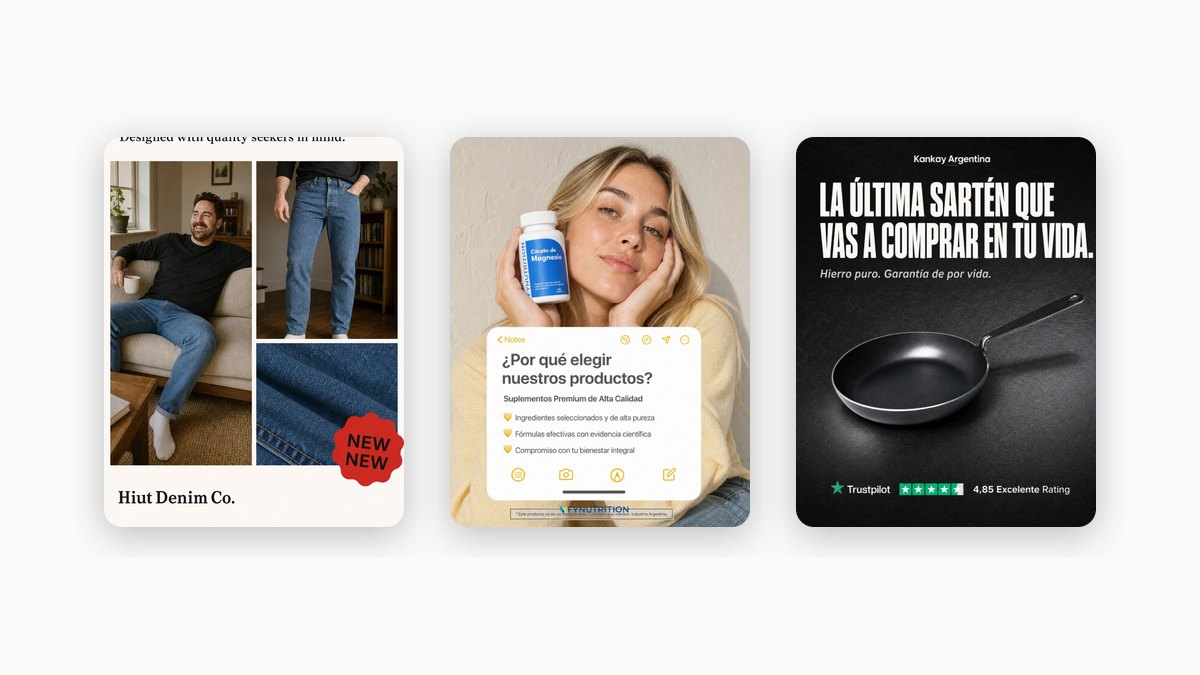
On Facebook, the ad is the part you control. Targeting and budget matter, but the image and the words decide whether a thumb stops or keeps moving. Common Thread Collective quantifies how much: "56% of all outcomes on Meta are driven solely by creative." A Facebook ad maker exists to produce that creative on demand, so you can put ten versions into the auction instead of briefing a designer for one. This guide covers what these tools do, the Meta specs they have to hit, and how to tell them apart before you subscribe.
What a Facebook ad maker is
A Facebook ad maker takes a small input and hands back a finished ad. You give it one of three things, a text prompt, a link to your product page, or a product photo, and it writes the headline, drafts the body, and lays out the visual. Most tools return the ad in a couple of placement sizes at once, so a single idea covers the feed and the story without you resizing anything by hand.
The line between a Facebook ad maker and a general design app is the output target. A design app gives you an empty canvas at any dimension you like. A Facebook ad maker is built to land on Meta's placements, and those placements have fixed frames and their own rules.
The Facebook ad specs a maker should handle
Those frames are the real job. An ad built to the wrong ratio shows up cropped or boxed in with padding, so a maker earns its keep by exporting to the sizes Meta actually serves. Here are the two placements most makers target, as of 2026:
| Placement | Aspect ratio | Recommended resolution (2026) |
|---|---|---|
| Facebook Feed | 4:5 (1:1 also works) | 1,440 × 1,800 px |
| Stories and Reels | 9:16 | 1,440 × 2,560 px |
The Facebook Feed numbers come from Meta's Ads Guide. The 9:16 Stories and Reels spec comes from Shopify's Facebook ad size guide. Meta also sets a minimum of 600 × 750 px for feed images and accepts JPG or PNG files up to 30 MB.
Placement specs get revised, so treat these as a baseline and confirm against Meta's Ads Guide before you launch.
One rule that used to catch people out is text on the image. Meta dropped the old "20% text" penalty back in September 2020, as Social Media Today reported, so an image carrying a lot of copy is no longer disapproved or held back in delivery. A Facebook ad maker can put a real headline on the image today. Keeping the text short is still advice worth taking, but it is a recommendation now, not a gate.
The types of Facebook ad makers
Sort the field by what a tool outputs, not by whose logo is on it. Five groups cover most of what you will run into, and a side-by-side of specific tools with pricing lives in the roundup of AI ad generators.
- Static-image makers. These build the feed and story image itself: headline, product, layout. AdCreative.ai, Canva, and Simplified all offer this. If you run image ads on Facebook, this is the center of the category.
- Video and UGC makers. These turn a prompt or a product link into short vertical video, sometimes with an AI presenter reading a script. Creatify is one example. Reach for this only if your Facebook plan leans on Reels-style video.
- Bulk and multi-format makers. These push out dozens of variants across sizes and networks in one pass. Creatopy (now "The Brief") aims at teams that need that volume plus a way to deploy it.
- Design suites with AI added. Canva and tools like it bolt generation onto a full editor. Ads share the app with slide decks and social posts, so a Facebook-only workflow tends to move faster on something narrower.
- Benchmark makers. These skip the blank prompt and start from an ad structure that already won, then rebuild it with your brand. Collecting proven ads to learn from is an old habit: a swipe file is "a library of creative marketing assets across all sources and mediums." A benchmark maker folds that collected structure straight into the output. Marketools (ours) works this way, covered below.
What to look for in a Facebook ad maker
Four questions narrow the field quickly.
- Static or video? This split decides the most. A video subscription sits idle if your Facebook account runs image ads, and a static tool leaves you stuck if you need Reels. Static holds its own as a format: Motion's static-ads playbook notes you can "build a brand in the early days almost entirely using static ads." Motion reports the brand Obvi reached $40M in revenue mostly on static before it added video. Buy for the ads you actually ship.
- One ad or a hundred? A founder posting a single ad has a different need than a media buyer testing forty hooks a week. Tools sit at one end of that range or the other, and paying for the wrong end wastes the plan.
- How on-brand is the output? Check whether the maker pulls your real colors, fonts, and product, or whether every export needs a cleanup pass first. An ad that reads as generic loses attention before the auction gets to work.
- Blank prompt or proven structure? A bare prompt gives you infinite range and no floor on quality. Starting from a layout that already converts gives you a floor to build up from. The winning static ad formula breaks down what a strong structure contains.
How Marketools makes Facebook ads
Full disclosure: Marketools is ours, so read this as us describing our own tool, not an impartial ranking.
Marketools runs on the benchmark approach. It treats every ad as two layers, a form and a message. The form is the winning structure. The message is your brand. Keep the first, swap the second.

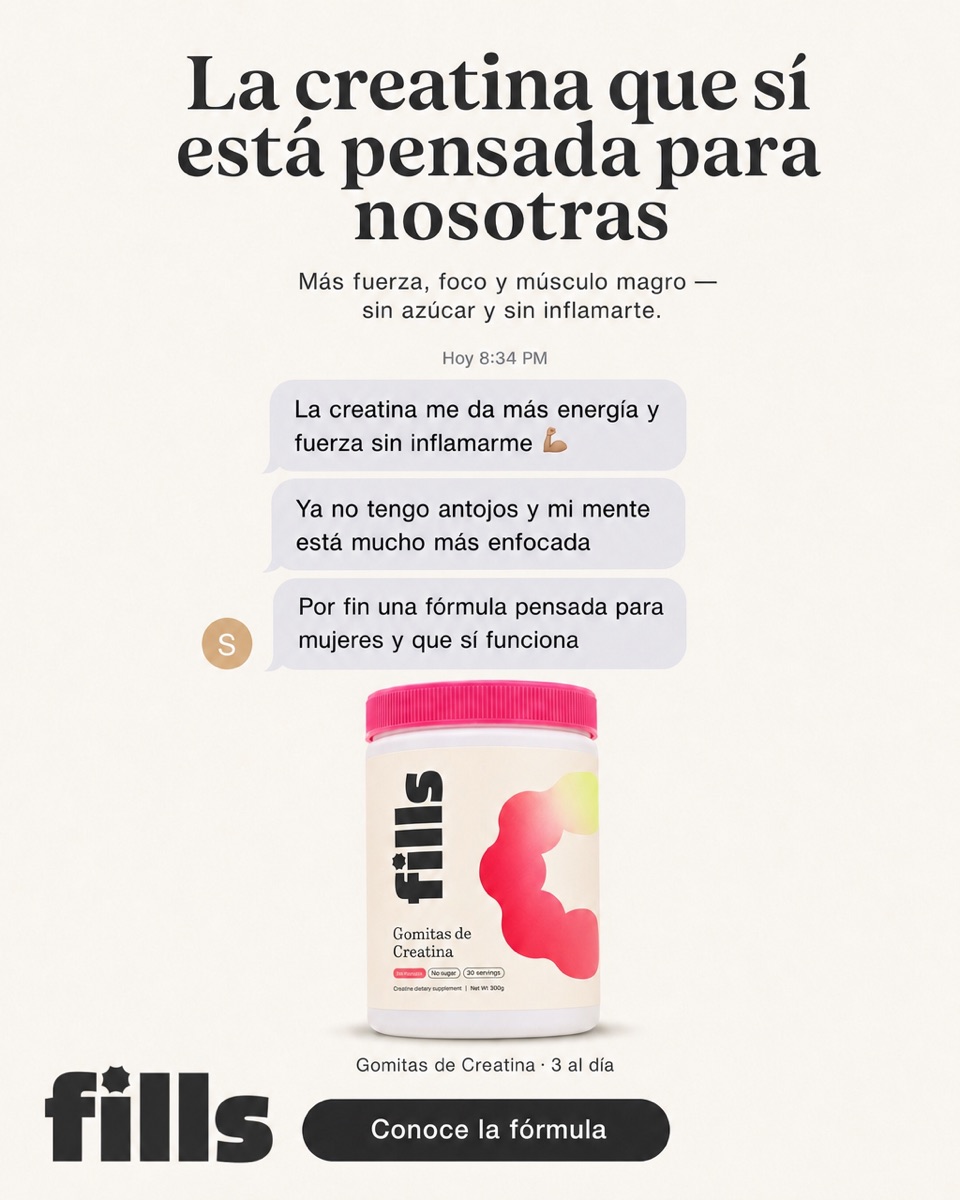
The flow is short. You drop in your store URL, Marketools reads the brand behind it (colors, fonts, tone, product catalog), and it rebuilds a proven layout as your ad, in feed (1:1) and story (9:16) at the same time. Because the hierarchy and copy formula come from the reference while the product and voice come from you, two stores running the same structure end up looking unrelated.
The Spy Center pulls live competitor ads from the public Meta Ad Library, so your starting point is something already running in your niche instead of a cold prompt.
Where it stops: Marketools makes static ads for one brand at a time. No video, no all-purpose design suite, no forty-network export machine. It fits benchmark-driven static plus competitor research. If your next move is video or high-volume multi-format, a tool from one of the groups above is the better buy.
FAQ
What does a Facebook ad maker produce?
An ad: a headline, body copy, and a visual, usually exported in a few placement sizes. Some makers give you a static image, some a short video, some both. The output quality tracks your input and how much brand detail the tool has to work from.
What size should a Facebook ad be?
As of 2026, Meta recommends 4:5 for Facebook Feed images at 1,440 × 1,800 px (1:1 also works), and Stories and Reels run 9:16 at 1,440 × 2,560 px. Specs change, so check Meta's Ads Guide for the current numbers before a launch.
Do I need to know design?
No, and removing that requirement is the point of the tool. You supply the input (a prompt, a URL, or a photo) and adjust what comes back. Makers that read your brand or start from a working structure leave you less to fix than ones that generate off a bare prompt.
What is the benchmark approach?
You take an ad layout that already performs and fill it with your own product, offer, and voice, instead of generating from nothing. The structure and copy formula are borrowed; the substance is yours. It is the swipe-file habit built into the generation step.
Knowing the category is step one; the next is building the ad. To start from a proven structure carrying your own brand, try Marketools, or open the Spy Center to work from an ad already live in your market. If you would rather do it by hand, how to make a Facebook ad walks through it.
Sources
- Common Thread Collective — Performance Ad Creative for Ecommerce Brands
- Motion — Static Ads Playbook: How They Fit Into a Creative Strategy
- Foreplay — The Swipe File: What is it and how to turn it into your secret weapon
- Meta — Ads Guide
- Shopify — Facebook Ad Sizes and Specs: Complete Guide for 2026
- Social Media Today — Facebook Is Removing Its Restrictions on Text Content in Facebook Ad Images
Related reading: How to make a Facebook ad · The winning static ad formula · Best AI ad generators · Spy on competitor ads in the Meta Ad Library